Broadbean integration
Integrate Broadbean with WordPress
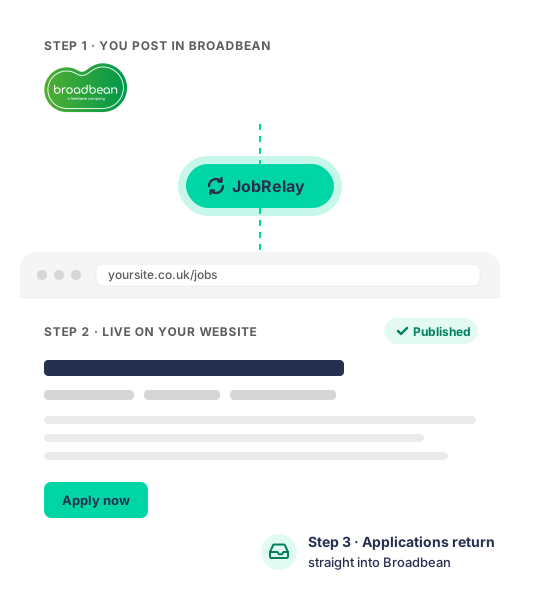
JobRelay connects Broadbean to WordPress. Choose JobRelay as a destination when you post in Broadbean, and the job appears on your website automatically, with edits and removals following.
Connected and syncing


Your WordPress site
- Broadbean stays the source of truth
- Nothing is posted twice
- Jobs are added, updated and removed for you
The problem
Posting Broadbean jobs to your website by hand doesn’t last
Your jobs already live in Broadbean. Keeping your website in step means doing everything twice, and sooner or later the manual process breaks.
- Jobs are copied and pasted from Broadbean into WordPress
- Filled roles are forgotten and left online
- Out-of-date listings damage candidates’ trust
- Candidates apply for jobs that no longer exist
- Your website becomes the least reliable place to find your jobs
How it works
An automatic bridge between Broadbean and WordPress
- Create your job in Broadbean as usual, with JobRelay selected as a destination.
- Broadbean pushes the job to JobRelay in near real time. There are no scheduled imports.
- JobRelay saves the job on your website as a native WordPress post.
- Edit or remove the job in Broadbean and your website updates automatically.
How it fits into WordPress
Native WordPress jobs, not embeds
Your Broadbean jobs are saved as real WordPress content in your own database. There are no iframes or third-party widgets, so jobs look and behave like the rest of your site.
- Full control over design and layout
- SEO-friendly job pages on your own domain
- Jobs you can filter, search and show anywhere on your site
- Works with RecPress, WP Job Manager, custom post types and bespoke builds
Applications
Every application sent back to Broadbean
Candidates apply on your website using your own form. Your website emails each application directly to the address Broadbean sends with the job, so it lands in Broadbean beside your job board applicants. Prefer Broadbean’s hosted application form? The apply button can link to that instead.
- Candidate data never passes through JobRelay
- Consultants work in one system
- Website and job board applicants side by side
- Use your own form or Broadbean’s hosted form
Benefits
What a Broadbean integration does for your agency
Post once, save hours
Manage jobs in Broadbean and your website updates itself. No copying, pasting or reformatting.
Always up to date
When a role is filled, Broadbean tells JobRelay and the job comes off your website automatically.
More direct applicants
Reach the candidates who apply on your own website, as well as those on the job boards.
Every application in Broadbean
Website applicants end up in Broadbean beside those from the job boards, so nothing slips through.
Jobs search engines can find
Each job is a real page on your own domain, so it builds your website’s authority rather than someone else’s.
Supported for the long term
We maintain the integration as WordPress and Broadbean change, so it keeps working without you thinking about it.
Why JobRelay
Why use JobRelay instead of a custom integration?
Broadbean offers APIs, but a bespoke WordPress integration carries long-term cost and risk.
A custom Broadbean API integration
- Weeks or months of developer time
- Fragile API code you have to maintain
- Can break when WordPress or Broadbean changes
- Often ends up as an iframe or embed
JobRelay
- Live faster, with no custom development
- No API code for you to maintain
- Ongoing support and updates included
- Native WordPress jobs, built for recruitment websites
Setup and installation
How to integrate Broadbean with WordPress
We set it up for you, so you don’t need a developer. Our team handles installation, field mapping and the conversation with Broadbean’s integration team.
JobRelay is built into Broadbean. Choose it as a destination when you post.
- Buy a JobRelay licence.
- We install the JobRelay connector on your WordPress site.
- We map Broadbean’s job fields to your website.
- Broadbean turns on JobRelay as a posting destination.
- Jobs sync as soon as you post them to JobRelay.
Typical timescale
Under 14 days
from your integration request to Broadbean to jobs on your website.
- Your WordPress site ready within hours
- We handle the whole process
Customer stories
What our customers say
“The JobRelay integration paid off from the very first month.”
Before JobRelay, there was so much extra effort involved in posting jobs to our own website that we just didn’t do it, leading to an empty jobs page! We’re now seeing candidates returning to the website, helping us to build trust and authority.

Harry Loft
Marketing Manager, Crewit Resourcing UK
“Excellent platform for streamlining recruitment advertising!”
We’ve had a fantastic experience using JobRelay. It has made posting jobs across multiple platforms incredibly fast and efficient, saving our team valuable time each week. The setup was seamless, and the support from the JobRelay team has been consistently responsive and helpful. Thanks to JobRelay, we’ve seen an improvement in both the quality and volume of applications.

Santino
Recruitment agency, Ireland
“Does exactly what we need with no fuss.”
We use JobRelay to integrate our CRM with our website. Responsive customer support when needed.
Richard
Recruitment agency, UK
“What a super smooth process.”
JobRelay has been so easy to integrate between our WordPress and Salesforce software. Appreciate the regular check-ins too, very uncommon to come by (and very much appreciated!). Great work guys.

Anna O’Dea
Recruitment agency, Australia
“We have had nothing but positive experiences with JobRelay.”
The product itself is easy to integrate, use and manage moving forward. The JobRelay team are always responsive and available to help with questions and assistance. We would highly recommend JobRelay for all recruitment websites.

John Paine
Juice
“Great product and great after service.”
Amazing service. Mark set it up and everything worked as expected. Should you have any questions down the line, Mark either answered my questions or jumped on and worked his magic. You will not be disappointed using JobRelay.

David Armstrong
Recruitment agency, UK
“JobRelay made setting up job postings on our own website easy.”
We are an Australian boutique recruitment firm using Idibu, WordPress and Bullhorn. JobRelay has been very helpful. Highly recommended.

Clayton Cook
Boutique recruitment firm, Australia
“JobRelay makes connecting your WordPress recruitment website to Broadbean simple and straightforward.”
Mark also provides excellent support. Highly recommended!

Laurence Doherty
Founder, Talent Sites
“Mark of JobRelay was very patient, understanding, and helpful in getting it resolved.”
JobRelay is an easy to use plugin for our website. Since working on the site, I’ve experienced very little in the way of problems. Thank you for the fantastic support!

Holly Fleming
Marketing Assistant, Connect Driver Solutions
Simple plans. Unlimited jobs.
Flexibility
Monthly
£49 / month
- Unlimited jobs
- Pay month to month
Best value
Save £169 a year
Annually
£419 / year
- Unlimited jobs
- Works out at £35 / month
Need licenses for several sites? Contact us about bulk pricing.
Broadbean integration FAQs
Some providers charge a fee to turn on JobRelay as a posting destination. We’ll tell you if Broadbean does before you start.
Each job comes with a set list of fields, plus any custom fields you use in Broadbean. See the full field reference guide.
Fields are mapped on the JobRelay settings page. Some map automatically, and the rest can be mapped to custom fields (post meta) or taxonomy terms. We do this for you during setup.
Broadbean pushes them. When you publish, update or remove a job with JobRelay selected, it’s sent automatically in near real time, with no scheduled imports.
Broadbean sends a delete command to JobRelay, which removes the job from your WordPress site.
Jobs are native WordPress posts, so they use your theme’s design. You control how they look, and they can be filtered, searched and styled like any other content.
You need a WordPress job board plugin or a custom post type for jobs. If you have neither, we can provide RecPress as part of your setup.
No. Field mappings can be set up to match your existing structure, and we can talk through any specific requirements during setup.
No. We handle installation, field mapping and coordination with Broadbean’s integration team.
Yes, as long as the staging site meets the technical requirements, including HTTPS. When you go live, the site address needs updating in both JobRelay and Broadbean.
No. Applications go directly from your website to Broadbean, so candidates’ personal data never passes through JobRelay.
Yes. Support and maintenance are included, as WordPress, Broadbean and related systems change.