
To get your jobs into Google for Jobs, each job needs its own page on your website with JobPosting structured data that Google can read. On WordPress, JobRelay adds that markup to every job it publishes, so jobs from Bullhorn, Broadbean, JobAdder or any other provider can appear in Google’s job search with no extra work.
This guide explains what Google for Jobs is, what Google needs from each job, and how to check your jobs qualify.
What is Google for Jobs?
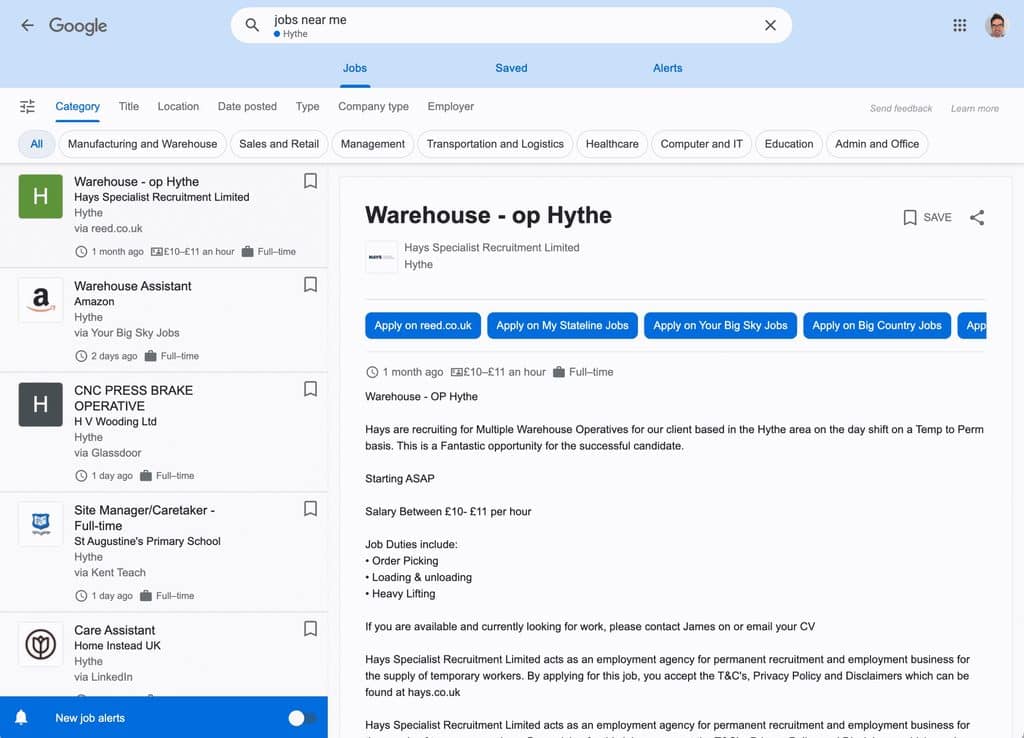
Google for Jobs is the job search panel that appears at the top of Google when someone searches for work, such as “warehouse jobs in Leeds” or “remote finance manager”. Candidates can filter by location, date posted, job type and employer, and each listing links to the pages where they can apply.
It is free. Google doesn’t charge to list jobs, and there is nothing to sign up to. It finds jobs by reading structured data on job pages across the web, including yours.
Why it matters for recruitment agencies
- Candidates start their search on Google. The jobs panel sits above the normal results, so a listed job gets seen before most job board links.
- Applications come to your own website. The listing links to your job page, so candidates apply with you rather than through a job board.
- It costs nothing per job. Once your job pages have the right markup, every job you publish is eligible.
Plenty of agencies are still missing out. When Highrise Digital checked the websites of the Recruiter Hot 100 agencies in 2022, only 61% had valid structured data for their jobs. That leaves around four in ten of the UK’s leading agencies with jobs Google for Jobs can’t read properly.
Only 61% of Recruiter 100 agency websites had valid structured data for their jobs.
Highirse Digital
Your jobs may also appear in Google for Jobs through the job boards you post to. Having the same job on your own site with good markup gives candidates the option to apply with you directly.
What Google needs from each job
Google reads a block of JobPosting structured data on each job page. Some properties are required, and others make the listing more likely to show and more useful to candidates. You can see the full list in Google’s job posting guidelines.
| Property | What it holds | Required? |
|---|---|---|
| title | The job title, without codes or salary | Yes |
| description | The full job description, as HTML | Yes |
| datePosted | When the job was first published | Yes |
| hiringOrganization | The organisation offering the job | Yes |
| jobLocation | Where the job is based (remote jobs use a different property) | Yes, unless fully remote |
| validThrough | The closing date | Recommended |
| employmentType | Full time, part time, contract or temporary | Recommended |
| baseSalary | The salary or rate, with its unit, such as per year or per hour | Recommended |
Google also has rules about where the markup goes. Each job needs its own page, the markup must match what’s on the page, and it must come off when the job closes. Search results pages and lists of jobs shouldn’t carry it.
How to get your WordPress jobs into Google for Jobs
There are three ways to add the markup on a WordPress recruitment website:
- Your job board plugin. Some plugins, including WP Job Manager, output basic JobPosting markup. Check it includes the salary and closing date fields.
- A general schema plugin. These can add JobPosting markup, but usually need the details entering by hand for each job.
- JobRelay. JobRelay builds the markup from the job data your provider sends, so it is added to every job automatically.
If you use JobRelay, getting set up takes a few minutes:
- Update to JobRelay 1.8 or later. Google for Jobs was added in version 1.8.
- Turn on Google for Jobs in the JobRelay settings. Add your hiring organisation details while you’re there.
- Check the Google for Jobs column in your jobs list. It shows whether each job has valid markup. Hover over a job’s status to see why if it doesn’t.
- Test a job page. Paste the URL into Google’s Rich Results Test to see the job exactly as Google reads it.
- Turn on Google Indexing. Google Indexing, added in JobRelay 1.9, tells Google the moment a job is added, updated or removed, so new jobs show up sooner and closed ones drop out faster.
Why jobs don’t show in Google for Jobs
Valid markup makes a job eligible, but Google decides what to show. If your jobs aren’t appearing, these are the usual causes:
- Missing location. A job with no location, and not marked as remote, isn’t eligible.
- Closed jobs still marked up. Google may trust your site less if expired jobs keep appearing. JobRelay removes closed jobs when they close in your provider.
- Markup in two places. If your job board plugin and another plugin both add JobPosting markup, the page can end up with two conflicting copies. Use the Rich Results Test to check there’s only one.
- Thin descriptions. Jobs with a line or two of text are less likely to be shown than jobs with a full description.
- Google hasn’t seen the page yet. New jobs can take days to be crawled. Google Indexing shortens that.
Google Search Console has a Job postings report under Enhancements once Google finds JobPosting markup on your site. It lists valid jobs and any errors to fix.
Google for Jobs FAQs
Yes. Google doesn’t charge to list jobs. You only need the right structured data on your job pages.
No. Google for Jobs is one of the features included with JobRelay, from £49 a month with unlimited jobs.
No. JobRelay adds the markup to jobs saved to WP Job Manager, RecPress, a custom post type or a bespoke build.
It depends on how quickly Google crawls your site. With Google Indexing turned on, Google is told about each job as soon as it’s published.
Yes. Google supports remote jobs, and they are marked up differently from jobs with an office address.
No. On a copy of your site at a different address, such as a staging site, Google Indexing only logs what it would send.
Want your jobs in Google for Jobs without adding markup by hand? Book a free consultation call and we’ll show you how JobRelay works with your provider, or read more about Google for Jobs in JobRelay.